Page 2 of 2
Posted: Fri Oct 21, 2005 1:38 pm
by bitWISE
Psyche911 wrote:Jesus, SOAP. WTF are you talking about?
BF2 is the one and only thing anybody here probably runs that benefits from 2GB of RAM. I know it would because when I quit it, my system has a shitload of data to load off the hard disk for Windows as BF2 was using up too much RAM.
Quake 4 doesn't do that. No other game does, which would make it quite apparent that they all run well within the amount of RAM I have. 1GB.
Actually....Ultra Quality Q4 requires 500mb for textures alone. I would say you should have atleast 1.5 if you plan on getting the most of next-gen games.
Posted: Fri Oct 21, 2005 2:06 pm
by Doombrain
pffft, i've still got SD ram in mine.
Posted: Fri Oct 21, 2005 3:10 pm
by Don Carlos
Nice choice Chunkeh

Posted: Sat Oct 22, 2005 12:12 am
by Psyche911
That's the one I've got.
I hate the fucking green LED fan. I'm about to open the fucker up and remove the LEDs...but that would void the warranty.
Posted: Sat Oct 22, 2005 5:47 am
by Cory
I'm waiting for the A8N32 to come out on the 10th of November.
http://www.monarchcomputer.com/Merchant ... IL=pg&NR=1
My build will be:
ASUS A8N32 SLI DELUXE
AMD Athlon 64 3700+ San Diego 1GHz FSB Socket 939
OCZ 2GB (2 x 1GB) 184-Pin DDR SDRAM DDR 400 (PC 3200)
BFG Tech BFGR78256GTXOC Geforce 7800GTX 256MB GDDR3 PCI Express x16
Hoping to run Quake4 perfectly.
Posted: Sat Oct 22, 2005 5:51 am
by Cory
losCHUNK wrote:eyyy cheers people, think ima be sticking with the venice core
gunna be getting an antec 460w powersupply
now then, the graphics card
the 7800 i was looking at was
BFG GeForce 7800 GT OC 256MB GDDR3 VIVO TV-Out/Dual DVI
http://www.overclockers.co.uk/acatalog/ ... eries.html
note its not the 7800GTX, worth it ? or worth getting the 6800 and getting the 7800GTX further down the line ? (which means i can put that extra 40 bucks into the 3700 san diego core) :]
It is my understanding that 6800gtx>7800gt
Posted: Sat Oct 22, 2005 5:52 am
by SoM
Cory wrote:losCHUNK wrote:eyyy cheers people, think ima be sticking with the venice core
gunna be getting an antec 460w powersupply
now then, the graphics card
the 7800 i was looking at was
BFG GeForce 7800 GT OC 256MB GDDR3 VIVO TV-Out/Dual DVI
http://www.overclockers.co.uk/acatalog/ ... eries.html
note its not the 7800GTX, worth it ? or worth getting the 6800 and getting the 7800GTX further down the line ? (which means i can put that extra 40 bucks into the 3700 san diego core) :]
It is my understanding that 6800gtx>7800gt
u might wanna fix that, there is no 6800gtx

Posted: Sat Oct 22, 2005 5:54 am
by SoM
and yes, 7800gtx > 7800gt
but the 7800gt can be OC'd to GTX speeds for less $$$ so u can get an extra gig o ram
Re: upgrade time
Posted: Sat Oct 22, 2005 6:50 am
by Sanction
Kills On Site wrote:Sanction wrote:losCHUNK wrote:what you guys think ? and what power supply should i be looking at ?
Enermax, Seasonic or OCZ
450w or more
Lets not forget Antec
I won't ever buy them, not after two failed within a moth of installation. :icon8:
Posted: Mon Oct 31, 2005 3:34 pm
by Psyche911
SOAPboy wrote:2 gigs of ram..
Why anyone buys 1 anymore is beyond me..
Proof here that aint true, SOAP:
http://www.firingsquad.com/hardware/qua ... /page6.asp
Run with Ultra quality with 1GB and 2GB of RAM. It doesn't make a bit of difference.
Posted: Mon Oct 31, 2005 3:44 pm
by Giraffe }{unter
With some of the software I use I regularly get up to 1.0 gig of ram usage and sometimes even 1.5. The performace of my PC was greatly increase when I added the extra ram.
Posted: Mon Oct 31, 2005 3:59 pm
by bitWISE
Giraffe }{unter wrote:With some of the software I use I regularly get up to 1.0 gig of ram usage and sometimes even 1.5. The performace of my PC was greatly increase when I added the extra ram.
Yeah, my next upgrade will probably be another gig.
Posted: Mon Oct 31, 2005 4:05 pm
by Deathshroud
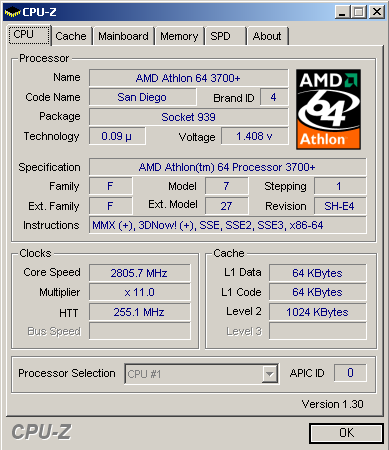
IMO, everyone needs one of these...
Posted: Mon Oct 31, 2005 4:28 pm
by Psyche911
Nice. On stock air or what?
I was gonna get the 3500+, but the 3200+ is only $150 now. Such a good price I'm gonna save the $50 and go for it. I'll still be able to clock it to at least 2.5GHz at 1:1 memory ratio.
Posted: Mon Oct 31, 2005 4:30 pm
by AmIdYfReAk
Hummm, i can only get my 939 3200+ to 2.4ghz, and it crashes basically no matter what i do ( oddly enough, only after about 2 days of usage )
Posted: Mon Oct 31, 2005 5:15 pm
by Deathshroud
That OC is with a Thermaltake Silentboost, and some Artic Silver 5. I have it running on a CPU/14 divider (or 5/06, depending on how you like it). That way my RAM is running @ stock speeds, and I can keep my 2-2-2-5-10 timings. =)
EDIT: And the vCore is running stock * 104%, so about 1.41, that put my temps way up, but it was necessary for stability. My idle temp is avg 37C, and load is probably 48C, it occasionally gets into the low 50's which isn't too bad.
Posted: Mon Oct 31, 2005 5:28 pm
by shadd_
Psyche911 wrote:Nice. On stock air or what?
I was gonna get the 3500+, but the 3200+ is only $150 now. Such a good price I'm gonna save the $50 and go for it. I'll still be able to clock it to at least 2.5GHz at 1:1 memory ratio.
forget 1:1 with a64.
do whatever you need to keep latency low as possible. deathshroud has the right idea.
Posted: Mon Oct 31, 2005 5:33 pm
by Deathshroud
shadd_ wrote:Psyche911 wrote:Nice. On stock air or what?
I was gonna get the 3500+, but the 3200+ is only $150 now. Such a good price I'm gonna save the $50 and go for it. I'll still be able to clock it to at least 2.5GHz at 1:1 memory ratio.
forget 1:1 with a64.
do whatever you need to keep latency low as possible. deathshroud has the right idea.
Yea, basically increasing memory bandwidth doesn't do a whole lot performance wise. The king is definitely CPU clock speed.
EDIT: Check out
this thread at the DFI street forums for a good look at how a 1:1 ratio is really not necessary.
Because of this, OC'ing your comp can take a couple days as opposed to an entire week. I attained this OC in 2 days, had it running Prime95 for 10hrs 45 min, w/ no errors or warnings =)
Posted: Mon Oct 31, 2005 5:35 pm
by shadd_
and low latency.
Posted: Mon Oct 31, 2005 5:38 pm
by Deathshroud
Yea, the low latency has a good effect on everyday performance. But gaming wise not too much I think.
Posted: Tue Nov 01, 2005 3:49 am
by Psyche911
shadd_ wrote:Psyche911 wrote:Nice. On stock air or what?
I was gonna get the 3500+, but the 3200+ is only $150 now. Such a good price I'm gonna save the $50 and go for it. I'll still be able to clock it to at least 2.5GHz at 1:1 memory ratio.
forget 1:1 with a64.
do whatever you need to keep latency low as possible. deathshroud has the right idea.
I can do both with my BH-5, was my point.

My current CPU maxes out before the RAM does at 2-2-2-5 timings @ 240MHz = 2.8GHz on my P4. Needs 3.4vdimm, but it does it stable and with as low of timings as possible.
Posted: Tue Nov 01, 2005 4:13 am
by shadd_
nice stuff. :icon14:
Posted: Tue Nov 01, 2005 6:02 am
by bitWISE
AmIdYfReAk wrote:Hummm, i can only get my 939 3200+ to 2.4ghz, and it crashes basically no matter what i do ( oddly enough, only after about 2 days of usage )
I decided to overclock mine and this seems to be the best I can hit with my XP-90. Still a huge boost over 2211.

Tomorrow I'll get my RAM maxed out and then I'm moving on the my roommates rig that I built a week or so ago.
Posted: Tue Nov 01, 2005 2:16 pm
by Cory
i bought the 4000+ instead of the 3700+ for my build. Been 5 days on 3 day mail (though 3 of the days included saturday/sunday/haloween, so i'll cut them some slack
)
Hoping it arrives today.
Posted: Tue Nov 01, 2005 4:27 pm
by Deathshroud
Yea, I just went with the 3700+ because it was the cheapest CPU with a 1meg cache. Clock speed didn't matter to me because I was going to OC anyways.